
FAQ — AutoPilot
📋 FAQ — AutoPilot
Section titled “📋 FAQ — AutoPilot”Contents:
- 📧 Mail Providers
- 🔐 2FA: How It Works
- 🏎️ Speed Modes (speed_mode)
- 🧩 Proxy and Captcha
- 📊 AutoPilot_table.xlsx
- 📈 Trading: Details
- 💸 Withdrawal (withdraw)
- 🌐 AdsPower / Dolphin / Vision / Afina
- 🖥️ Screen Size
- ⚙️ Configuration: Key Parameters
- 🔒 Security and Privacy
- 🔄 Updates
- ⏰ License Duration
- 🚨 Common Errors and Solutions
- 💬 Contact Developer
- 🍎 Launching on macOS
- 📧 Outlook: the “Unexpected close” error
- 🛡️ VPN for pilots: system proxy mode
1. 📧 Mail Providers
Section titled “1. 📧 Mail Providers”Available providers (column [EMAIL] mail_provider / [EMAIL] forwarding_mail_provider):
| Provider | IMAP App Password | Notes |
|---|---|---|
| notletters | — | Recommended ✅ |
| firstmail | — | Recommended ✅ (also for forwarding) |
| rambler | — | Recommended ✅ (also for forwarding) |
| gazeta | — | |
| onet | — | |
| gmx.com / gmx.net | — | |
| nic.ru | — | |
| yahoo | Required 🔑 | App Password in security settings |
| gmail | Required 🔑 | App Password (requires 2FA on Google account) |
| outlook | OAuth2 🔑 | Refresh token (M.-prefix) — auto-detected, see Pattern 3 |
| mailru | Required 🔑 | App password in security settings |
| yandex | Required 🔑 | App password in settings |
| icloud | Required 🔑 | App-Specific Password at appleid.apple.com |
| inbox.eu | Required 🔑 | |
| proton | Required 🔑 | Proton Mail Bridge (paid subscription) |
🔀 Forwarding — if your provider requires an app password, set up email forwarding to firstmail/rambler/gmx and fill in the columns:
[EMAIL] mail_forwarding_provider— forwarding provider[EMAIL] forwarding_mail— forwarding email address[EMAIL] forwarding_mail_password— forwarding email password
🍎 App-Specific Password for iCloud / Apple ID: Apple’s official guide — support.apple.com/en-us/102654
⚠️ Important: after setting up forwarding, send a test email to make sure messages arrive. Some providers activate forwarding with a delay of up to 24 hours.
🛡️ Antivirus: if you have issues connecting to mail — check if your antivirus is blocking IMAP ports (993, 143).
💬 Your provider not listed? Contact the developer — it will be added.
📦 Pattern 1: ready-made mailboxes (simple and fast)
Section titled “📦 Pattern 1: ready-made mailboxes (simple and fast)”The simplest path — buy a pack of mailboxes from a trusted vendor and use them directly. No setup, no forwarding.
Where to buy: KYC SHOP by NVS — packs of firstmail / notletters with ready login and password for IMAP.
How to plug in:
- Buy a pack of mailboxes from the shop
- Fill only three columns in the AutoPilot table:
[EMAIL] mail= email address from the pack[EMAIL] mail_password= password from the pack[EMAIL] mail_provider=firstmail/notletters
- Done — no forwarding needed, AutoPilot reads IMAP directly
💡 Suitable for most tasks — KYC on any exchange, email verification, registrations.
🍎 Pattern 2: iCloud farm
Section titled “🍎 Pattern 2: iCloud farm”Alternative for those building a large-scale farm. Uses Hide My Email from iCloud+ — one main inbox receives mail from a thousand sub-addresses.
| Pros | Cons |
|---|---|
| 🟢 $0.99/mo → up to 1000 hidden email addresses | ❌ iPhone required to activate iCloud+ |
| 🟢 All emails arrive in one main inbox — read one IMAP instead of 1000 | ❌ Apple rate-limits creation (workaround — hidemyemail-generator) |
| 🟢 Apple signs domains — anti-spam, anti-detection | |
| 🟢 Especially stable with Bybit |
How to set up:
- Buy an iPhone + subscribe to iCloud+ at icloud.com/icloudplus
- iCloud → Hide My Email → create new addresses (manually or via script)
- All hidden emails forward automatically to the main iCloud inbox
- App-Specific Password for the main mailbox — support.apple.com/en-us/102654
- Fill in the AutoPilot table:
[EMAIL] mail=hidden_xxxx@icloud.com(one of 1000)[EMAIL] mail_provider=icloud[EMAIL] forwarding_mail= your mainmain@icloud.com[EMAIL] forwarding_mail_password= App-Specific Password of the main mailbox[EMAIL] mail_forwarding_provider=icloud
Deleting addresses and rotation (churning the farm):
You can free up slots for new addresses, with caveats (verified against Apple Support):
- Only deactivated addresses can be deleted — Deactivate first, then Delete. At
icloud.com/icloudplus→ Hide My Email → pick the address → Deactivate, then at the bottom under “N inactive addresses” → Delete address. - Deletion is permanent: the old address can’t be recovered or reused — recreating gives you a new random address.
- Deletion frees a slot: at the cap Apple literally says “delete one before creating another” — delete one, then create a new one.
- Not infinite and not instant. Apple throttles creation: ~5 new addresses / 30 min (× number of family members), with a ~30–60 min cooldown when you hit it. Soft ceiling ~500–1000 addresses per account.
⚙️ What AutoPilot does itself. The built-in HME generator (pure-HTTP, no browser) creates and reserves addresses respecting Apple’s limits (5/30 min, auto-cooldown on 429). Deletion is still manual at
icloud.com. So churning the farm = delete manually → AutoPilot generates new ones.
Detailed video guides:
📨 Pattern 3: Outlook / Hotmail via refresh token
Section titled “📨 Pattern 3: Outlook / Hotmail via refresh token”Microsoft disabled Basic Auth for IMAP on consumer Outlook / Hotmail accounts in 2024 — a plain mailbox password no longer works. Only OAuth2 with a refresh token does.
Mailbox vendors (e.g. KYC SHOP by NVS) sell Hotmail combos in this format:
email:password:recovery_email:recovery_url:2step_codes:M.C510_BAY...AutoPilot only needs two fields: email and the long token at the end (starts with M.).
How to plug in:
- Buy a Hotmail combo pack from the shop
- Fill three columns in the AutoPilot table:
[EMAIL] mail=name@hotmail.com(first field of the combo)[EMAIL] mail_password=M.C510_BAY...(last field — the refresh token, not the regular password)[EMAIL] mail_provider=outlook
- Done — AutoPilot detects the refresh token by the
M.prefix, exchanges it for an access token via Microsoft, and connects to IMAP using XOAUTH2
🔄 Auto-refresh: the access token lives ~1 hour, AutoPilot refreshes it in the background without pilot interaction.
💡 Plain passwords still work for accounts where Basic Auth isn’t disabled (legacy corporate / forwarding mailboxes). If the password doesn’t start with
M.— classic IMAP login/password is used.
2. 🔐 2FA: How It Works
Section titled “2. 🔐 2FA: How It Works”- When enabling 2FA, the software saves the secret key to the
[2FA] totp_secret_codecolumn - This key can be imported into any authenticator app: Google Authenticator, Authy, 1Password, etc.
- AutoPilot automatically generates and enters TOTP codes when needed
- To manually generate a code from the secret key: totp.danhersam.com
💾 Backup:
totp_secret_codeis additionally saved to profile logs (/logsfolder) — even if you accidentally clear the table, the secret key can always be found in the logs.
⚡ Auto-setup: actions
whitelistandwithdrawwill automatically enable 2FA if it’s not set up yet. No need to run2faseparately.
⏰ 2FA codes not working? TOTP codes depend on your computer’s exact time. If the exchange rejects a code — sync your clock: Windows: Settings → Time & Language → Date & time → Sync now. macOS: System Settings → General → Date & Time → Set time and date automatically.
🌐 Bybit: 2FA issues? If the email code doesn’t arrive when setting up Google Authenticator — set
bybitglobalin the[BYBIT] domaincolumn of your table. In some regions,bybitglobal.comis more reliable. See Bybit AutoPilot → Bybit Global Domains for details.
3. 🏎️ Speed Modes (speed_mode)
Section titled “3. 🏎️ Speed Modes (speed_mode)”| Mode | Cursor | Text Input | When to Use |
|---|---|---|---|
| ⚡ FAST | Instant movement | Fast input without errors | Bulk operations where speed matters |
| 🚗 MEDIUM | Smooth movements, medium speed | Human-like input with minimal errors | Balance between speed and naturalness |
| 🐢 SLOW | Slow movements with random trajectory | Input with typos and corrections | Maximum human imitation |
🖱️ Smart Cursor (MEDIUM/SLOW): simulates human mouse movements with random trajectory, accelerations and decelerations.
⌨️ Human Typing (MEDIUM/SLOW): random delays between characters, random typos with auto-correction — like a real person.
💡 Recommendation: FAST is sufficient for registration and login. For trading and actions on pages with anti-bot protection — use MEDIUM.
4. 🧩 Proxy and Captcha
Section titled “4. 🧩 Proxy and Captcha”Column [PROXY] proxy — profile proxy in format ip:port:user:password
✅ No need to fill in — AutoPilot automatically takes the proxy from your AdsPower / Dolphin / Vision / Afina profile on the fly. The captcha is solved from the profile’s IP so it matches the IP the rest of the traffic comes from. Everything happens automatically.
🏠 The proxy must be residential. The built-in solver submits the captcha check from the profile’s IP, and GeeTest does not accept datacenter IPs — the check simply fails. A cheap datacenter proxy means constant captcha failures even when everything else is configured correctly.
🔄 Auto-rotation: Bybit mirrors and proxy sessions
Section titled “🔄 Auto-rotation: Bybit mirrors and proxy sessions”Sometimes registration is blocked not by the account but by where you came from: the exchange checks the reputation of the exit IP, and if too many accounts were created from that address, the refusal arrives before the confirmation code does. AutoPilot handles this itself — in two steps.
Step 1 — a different Bybit mirror. Bybit is several domains, and each has its own gate. The very same IP the main domain refuses often passes on bybitglobal.com without a fuss. Pilots used to switch that domain by hand — now AutoPilot walks the mirrors itself:
bybit.com → bybitglobal.com → bybit-global.com → bytick.com📌 The working mirror is remembered. Bybit’s domains are separate exchanges with separate account pools: an account created on
bybitglobal.comdoes not exist onbybit.com. So AutoPilot writes the mirror that worked into the[BYBIT] domaincolumn, and every later action on that profile follows it there. No more setting it by hand.
Step 2 — a fresh proxy session. If the mirrors run out, the address really is the problem. On residential proxies the session number is part of the login:
customer-country-ge-sid-9f4c2ab71e08 └─country┘ └─ session ┘Only the session number changes — and you get a fresh IP in the same country. AutoPilot never touches the country: otherwise the account would quietly move to another geo.
| Run mode | What happens |
|---|---|
| ⚡ AutoPilot Engine | Takes a fresh session and carries the registration through on its own — up to 3 tries, hands off |
| 🌐 Antidetect browser | The proxy belongs to the AdsPower / Dolphin / Vision / Afina profile, so AutoPilot writes a ready login with a new session into the log |
Providers with rotation support: NodeMaven, Proxyshard, DataImpulse, Bright Data.
🆓 Built-in Captcha Solver
Section titled “🆓 Built-in Captcha Solver”AutoPilot solves captcha on its own, inside the exe — no third-party services, no per-solve fees, no browser.
| Exchange | Captcha | Solved by | Cost |
|---|---|---|---|
| Bybit | GeeTest v4 | 🆓 built-in solver | $0 |
| MEXC | GeeTest v4 | 🆓 built-in solver | $0 |
| Bitget | GeeTest v4 | 🆓 built-in solver | $0 |
⚡ How it works: AutoPilot always tries to solve the captcha itself first and only reaches for a paid provider if it runs into a rare type the built-in solver doesn’t handle yet. Most captchas on Bybit, MEXC and Bitget are covered — you pay nothing for those.
🚀
captcha_keyis no longer required. Without a key AutoPilot starts and runs normally — it just prints a warning that the paid backup is off. Older builds used to hang forever on an empty or drained balance; current builds don’t.
💵 Paid Provider — Backup Only
Section titled “💵 Paid Provider — Backup Only”A key is only needed for the rare captcha types the built-in solver doesn’t take yet, and as a backup if it fails on a retry. In everyday use that is uncommon — if you never run into it, you don’t need a key at all.
| Provider | captcha_provider | Type | Website |
|---|---|---|---|
| CapSolver ⭐ | capsolver | Token (GeeTest v4) | capsolver.com |
| CapMonster | capmonster | Token (GeeTest v4) | capmonster.cloud |
| 2Captcha | 2captcha | Token (GeeTest v4) | 2captcha.com |
⭐ If you do get a key — get CapSolver. Token-based GeeTest v4 solving, API-first approach, new captcha types picked up quickly.
Example configuration:
captcha_key=CAP-YOUR_KEY_HERE💡 Auto-detection: AutoPilot automatically detects the captcha provider from the key format. A key starting with
CAP-means CapSolver. You don’t need to setcaptcha_provider— just paste the key intocaptcha_key, and AutoPilot will figure out which service it is.
🔑 How to Set Up CapSolver (Step by Step)
Section titled “🔑 How to Set Up CapSolver (Step by Step)”ℹ️ This step is optional — only needed if you want a paid backup for rare captcha types.
- Register at capsolver.com
- Go to Billing → Top Up and add balance via crypto
- Copy your API Key from the dashboard (Overview → API Key)
- Paste the key into
AutoPilot.config:captcha_key=CAP-your_key - Done — AutoPilot will automatically detect that it’s CapSolver
⚠️ Do NOT buy packages on the Market page! Those are subscriptions for specific captcha types (reCAPTCHA v2 50K for $36, reCAPTCHA v3, etc.) — AutoPilot doesn’t use them. AutoPilot works with GeeTest v4 (token-based), which only requires account balance, not a package subscription.
💰 Cost: the provider charges ~$1 per 1000 GeeTest solves, but you only pay for captchas the built-in solver didn’t take — balance goes on rare types, not on every login.
🔧 Captcha errors — what to do:
- Check the proxy first. A datacenter IP breaks both the built-in solver and the paid one. You need residential.
- If the log shows AutoPilot handing off to the paid provider, you hit a rare type. Add a
captcha_keyfromcapsolver/capmonster/2captcha.- If the captcha fails before any handoff to a provider, topping up won’t help — it isn’t a money problem. Check the proxy and update AutoPilot.
- The key must be from
capsolver,capmonsteror2captcha— only those do token-based GeeTest v4. A key from any other service gives you no backup.
5. 📊 AutoPilot_table.xlsx
Section titled “5. 📊 AutoPilot_table.xlsx”Basic rules:
- 🚫 Do not rename column headers from the template
- ↔️ Column order can be changed
- ➕ You can add your own columns (AutoPilot ignores them)
- ⏳ Do not delete rows while the software is running — wait for completion
🚀 Minimum set to start (registration):
[PROFILE] profile_id— Profile ID from AdsPower/Dolphin (in AdsPower that’s the ID column, NOT “Number” — why)[EMAIL] mail_provider— mail service[PROFILE] mail— email address[EMAIL] mail_password— email password
💡 Tip: only fill the
ACTIONcolumn for profiles you want to automate. Empty ACTION = profile will be skipped.
➕ Action chains: several ACTIONs in one pass
Section titled “➕ Action chains: several ACTIONs in one pass”The ACTION cell can hold a whole scenario rather than a single action — steps joined with +:
register+learn+whitelistThe steps run in order on each account. Accounts still run in parallel (parallel_limit) — the ordering applies only within a single account.
Why it exists:
- Running three actions on the same accounts used to mean launching the batch three times in a row, waiting for each to finish and re-selecting the profiles every time
- The profile browser is not relaunched between steps — one session for the whole chain instead of three antidetect profile starts
Config settings:
| Key | Default | What it does |
|---|---|---|
combo_action_delay | 30,120 | Random pause in seconds between two steps of one account. Lower it for throughput, raise it to look less like a bot |
combo_keep_browser | YES | One browser for the whole chain. Set it to NO if you want a clean profile launch on every step |
⚠️ If a step fails, the remaining steps for that account are skipped. Other accounts keep going.
📝 Spaces around
+do not matter, and neither does case:Register + Learn=register+learn. If even one step in the chain is misspelled or unavailable on your plan, the whole row is skipped.
🔑 Passwords: if
passwordis not filled — AutoPilot will generate a strong password automatically (8-30 chars, uppercase + lowercase + digits + special characters) and write it to the table.
📁 Is Excel fully closed? The table must be completely closed while AutoPilot is running:
- Clicking ✕ in Excel is often not enough — Windows keeps
EXCEL.EXErunning in the background (due to OneDrive sync, AutoSave, multiple windows). Check Task Manager (Ctrl+Shift+Esc→ Processes tab → findEXCEL.EXE→ End task)- Quick alternative — via command line:
taskkill /IM EXCEL.EXE /F- If
EXCEL.EXEis lingering in the background, AutoPilot reads stale data or can’t open the file at all. Classic symptom: “table data doesn’t refresh in console, only a PC reboot helps”
☁️ AutoPilot must be in a local folder, not OneDrive / Dropbox / iCloud Drive / Google Drive / any other cloud sync. Cloud-sync keeps
AutoPilot_table.xlsxopen in the background for syncing and blocks AutoPilot from reading/writing.Where to put it:
C:\AutoPilot\orD:\AutoPilot\— any local drive- Or most conveniently — on the desktop:
\Desktop\AutoPilot\(on Windows 11, make sure Desktop isn’t synced by OneDrive — OneDrive tray icon → Settings → Backup → disable Desktop)
6. 📈 Trading: Details
Section titled “6. 📈 Trading: Details”🪙 Multi-coin: specify coins, amounts and cycles separated by commas:
[TRADING] trading_coin=BTC,ETH,SOL[TRADING] trading_amount=10,20,5[TRADING] trading_cycles=3,5,2- Result: 3 cycles of BTC at $10, then 5 cycles of ETH at $20, then 2 cycles of SOL at $5
🧮 Volume formula: cycles x amount x 2 (buy + sell)
📐 Dynamic order size: if balance is less than trading_amount — the software automatically reduces order size to available balance.
⏱️ Delay between cycles: configured in settings market_trading_delay=5,15 (random delay from 5 to 15 seconds).
💵 Minimum order: make sure there’s enough USDT for the minimum order on the exchange (usually ~5 USDT).
6.1 🤖 Smart Futures Trading (futures_smart)
Section titled “6.1 🤖 Smart Futures Trading (futures_smart)”ACTION: futures_smart — automated futures trading with market analysis, post-only limit orders and position management.
💰 Fees: post-only limit orders = 0.02% (maker), market close = 0.055% (taker). Total ~0.075% per cycle — 32% cheaper than market orders (0.11%).
📊 Table columns:
| Column | Description | Example |
|---|---|---|
[TRADING] trading_coin | Futures coin | BTC |
[TRADING] trading_amount | Position size per iteration (with leverage) in USDT | 1000 |
[TRADING] trading_cycles | Number of trading cycles | 15 |
🔑 Important:
trading_amountis the position size including leverage, not the actual balance used. Real balance per trade =trading_amount / leverage.
📐 Formula:
- Real balance per trade =
trading_amount ÷ leverage - Volume per cycle =
trading_amount × 2(open + close) - Target volume =
trading_amount × cycles × 2
Example: trading_amount=1000, leverage=10, cycles=15
- Real balance per trade: 1000 ÷ 10 = 100 USDT
- Volume per cycle: 1000 × 2 = 2,000 USDT
- Target volume: 1000 × 15 × 2 = 30,000 USDT
⚙️ Config parameters:
| Parameter | Description | Default |
|---|---|---|
leverage | 📊 Leverage | 10 |
limit_futures_position_hold_interval | ⏳ Position hold time, sec (min,max) | 50,240 |
limit_futures_iteration_wait_interval | 💤 Pause between cycles, sec (min,max) | 60,180 |
limit_futures_order_timeout | ⏱️ Max wait for limit order fill, sec | 30 |
limit_futures_order_check_interval | 🔍 Order execution check interval, sec | 5 |
limit_futures_price_offset_ticks | 📐 Offset in ticks from best bid/ask | 2 |
limit_futures_direction_algorithm | 🧠 Direction detection algorithm | inverse_simple |
limit_futures_order_deviation | 🎲 Random position size deviation, % (0 = off) | 0 |
🧠 Direction algorithms:
simple— follows the trend: analysis of last 5 candles + price vs MA5 (rising → Long, falling → Short)inverse_simple— counter-trend: inverts the simple signal (rising → Short, falling → Long)advanced— complex analysis: EMA 8/21 crossover + RSI 14 + Volume Spike (1.7x above average) + Funding Rate
⚠️ Risks: leveraged futures trading carries liquidation risk. Use moderate leverage and small amounts for volume generation.
💡 Tip: if an order isn’t filled within
limit_futures_order_timeout— the signal is recalculated. Increaselimit_futures_price_offset_ticksfor faster fills (but at a less favorable price).
6.2 🧩 Puzzle Hunt (puzzle_hunt)
Section titled “6.2 🧩 Puzzle Hunt (puzzle_hunt)”ACTION: puzzle_hunt — automatic registration, task completion and management of Bybit puzzles.
✨ Features:
- 📱 Automatic puzzle registration and management
- 📱 Instant execution and claiming of social tasks via direct requests
- 📱 Automatic daily trading tasks and check-ins
- 📱 Specify multiple puzzles at once — the system handles everything
- 📱 Won’t waste trading attempts if daily check-in is already closed
- 📱 Tracks key data: days completed / total, plus puzzle completion status
📊 Table column:
| Column | Description | Example |
|---|---|---|
[PUZZLE] event_code | Puzzle code (or multiple, comma-separated) | 0768558741987 |
📌 Column type: make the
[PUZZLE] event_codecolumn text (not numeric), otherwise Excel may truncate long codes.
🔗 Where to get the puzzle code:
The code is in the puzzle link — the activityCode parameter:
https://www.bybit.com/en/trade/spot/puzzle-hunt/detail?activityCode=0768558741987 ^^^^^^^^^^^^^ — this is the code📋 Managing multiple puzzles:
To complete multiple puzzles at once — enter codes separated by commas:
8675373977840,0768558741987,1234567890123The system processes each puzzle sequentially: social tasks → trading (batched) → check-ins.
⚙️ How it works internally:
- Limit check — before any work, checks if the daily check-in is available. If limit is reached — the entire puzzle is skipped (trading isn’t wasted)
- Registration — automatic participant registration in the puzzle
- Social tasks — completes all social tasks (follows, retweets) via direct API requests + claims rewards (puzzle pieces)
- Trading — if not traded today: buy + sell a coin from the puzzle list (~5 USDT volume). If already traded — skips
- Wait — 3-4 minute pause for Bybit’s server to register the trading volume
- Check-in — daily mark + receive puzzle pieces
📈 Table statuses:
| Status | Meaning |
|---|---|
DONE | ✅ Puzzle fully completed (all days passed) |
5/10 | 🔄 Progress: 5 of 10 days completed |
ENDED | ⏰ Puzzle expired (activity ended on Bybit) |
FAIL | ❌ Error (details in logs) |
With multiple puzzles, status is combined: [CODE1] DONE, [CODE2] 3/10
💡 Tip: run
puzzle_huntdaily — the software will determine what’s already done and only perform the missing steps.
⚡ puzzle_social: to only complete social tasks without trading — use ACTION
puzzle_social.
6.3 💰 Bybit Earn — USDT Staking (earn / unearn)
Section titled “6.3 💰 Bybit Earn — USDT Staking (earn / unearn)”ACTION: earn — send USDT to the Flexible Savings pool (automatic staking).
ACTION: unearn (or unstake) — withdraw USDT from the pool back to Funding account.
⚙️ How it works:
earn (staking):
- KYC verification and Bybit authorization
- Transfer all USDT from Trading to Funding account (
transferAllToFunding) - Get available USDT balance on Funding account
- Send to Flexible Savings pool: preview → pay-order → confirm-order
- Table status:
[STAKE] SUCCESS - stake 150.25
unearn (unstaking):
- KYC verification and Bybit authorization
- Get current Flexible Savings balance
- Withdraw from pool to Funding account: preview → pay-order → confirm-order
- Table status:
[STAKE] SUCCESS - unstake 150.25
📊 Table columns:
| Column | Description | Example |
|---|---|---|
[WITHDRAW] withdraw_amount | Fixed USDT amount (optional) | 100 |
💡 Default: if
withdraw_amountis not filled —earnwill send all available USDT to the pool, andunearnwill withdraw everything from the pool.
📌 Fixed amount: enter a number in
withdraw_amountto stake/withdraw a specific amount. If the requested amount exceeds available balance — the entire available balance will be used.
🏦 Flexible Savings: this is flexible staking — funds can be withdrawn at any time, interest accrues daily. Withdrawal is instant.
⚡ Auto-transfer: with
earn, funds are automatically transferred from Trading to Funding before staking — no manual action needed.
🔄 Aliases:
stake=earn,unstake=unearn— identical actions, use whichever you prefer.
6.4 🛒 Trading Variants (buy, limit, futures)
Section titled “6.4 🛒 Trading Variants (buy, limit, futures)”AutoPilot offers several trading actions for different scenarios:
| Action | Type | Description |
|---|---|---|
trading | Market | Buy-sell cycles with market orders. Volume = cycles × amount × 2 |
trading_limit | Limit | Same as trading, but uses limit orders for better prices |
buy | Market | One-time buy of a specific asset |
limit_buy | Limit | One-time limit buy order |
limit | Limit | Random limit trading for natural volume |
sell | Market | Sell all assets for USDT |
limit_sell | Limit | Sell on Funding account with limit orders |
futures | Market | Leveraged futures with market orders |
futures_smart | Limit | Smart futures with post-only orders (32% cheaper) |
💡 When to use which:
tradingfor quick volume,trading_limitfor better prices,futures_smartfor cheapest fees.buy/limit_buyfor one-off purchases.
📊 Columns: all trading actions use
[TRADING] trading_coin,[TRADING] trading_amount. Cycle-based actions also use[TRADING] trading_cycles.
6.5 🎁 Rewards & Events (lp, learn, ref_code, link, profit)
Section titled “6.5 🎁 Rewards & Events (lp, learn, ref_code, link, profit)”Quick-reference for actions that require no extra columns — just set the ACTION and run:
| Action | Description |
|---|---|
lp | Automatic registration in the current LaunchPad event |
learn | Complete learning modules and set profile avatar |
ref_code | Extract account referral code |
link | Get SUMSUB KYC verification link |
profit | Calculate profit: total withdrawals − total deposits + balance |
💡 All automatic: these actions need only
profile_idand login credentials. No extra columns to fill.
🚀 LaunchPad (
lp): fully automatic — finds the current active event and registers. Run periodically when new events appear.
7. 💸 Withdrawal (withdraw)
Section titled “7. 💸 Withdrawal (withdraw)”Full withdrawal (full_withdraw=YES in config):
- 🔄 Sell all assets for USDT at market
- 🧹 Convert dust and small leftovers
- 💳 Withdraw entire balance
Partial withdrawal: specify % in withdraw_amount column (100 = all, 50 = half)
🌐 Network name: enter exactly as shown on the exchange. Examples:
- Bybit:
APTOS,Arbitrum One,BSC (BEP20) - MEXC:
ERC20,TRC20,Aptos - Bitget:
BSC,Arbitrum One
✅ Whitelist + Withdraw: if the withdrawal address matches the whitelisted address — code verification won’t be required (fast withdrawal).
🏷️ Memo/Tag: if the network requires a memo (e.g., TON, ATOM) — fill in the
withdraw_memocolumn. If not required — leave empty.
7.1. 🔑 Master Wallet System — Automatic Whitelists & Untraceable Withdrawals
Section titled “7.1. 🔑 Master Wallet System — Automatic Whitelists & Untraceable Withdrawals”Withdraw from hundreds of accounts without manually entering a single address. AutoPilot creates a unique wallet for each account, whitelists it automatically, and collects all funds to your master wallet — with $0 fees and no traceable links between accounts.
What you get:
- 🏷️ Automatic whitelists — no need to create addresses or fill them in the table. AutoPilot generates a unique address for each account and whitelists it on Bybit with full email/2FA confirmation
- 🕵️ Untraceable withdrawals — every account withdraws to its own unique address. No shared address = no way to link your accounts together
- 💰 $0 withdrawal fees — Bybit doesn’t charge for Aptos withdrawals (vs $1-2 per account on ERC20/TRC20)
- 📥 One-click collection — after withdrawal, collect all funds from all addresses to your master wallet in seconds
- ⚡ Instant transfers — funds arrive in ~1 second
How it works (3 actions):
-
setup_aptos_hd— run once. Creates your master wallet and gives you a secret phrase (12 words). One phrase = unlimited unique addresses. -
whitelist_aptos_hd— run on all profiles. AutoPilot will:- Create a unique Aptos address for each account
- Open Bybit, add it to whitelist, confirm email/2FA — all automatically
- Save everything to the table
-
withdraw— withdraws all USDT to the whitelisted address on each account. Fee = $0.
After withdrawal — open the Distribute tab and collect everything to one wallet with one click.
| Config Parameter | Description | Default |
|---|---|---|
aptos_hd_enabled | Enable Master Wallet system | NO |
aptos_hd_auto_assign | Auto-assign address to new profiles | YES |
aptos_distribution_master_key | Master wallet private key (hex) | — |
aptos_distribution_master_index | Index of the master wallet | 0 |
aptos_distribution_amount | USDT amount per distribution | 0.5 |
💡 Example: you have old Bybit accounts with leftover funds. Instead of manually creating addresses, entering them one by one, and collecting from each wallet — run 3 actions and everything lands on your master wallet. Zero manual work, zero fees, zero links between accounts.
🔁 Safe to re-run: if an account already has an address,
whitelist_aptos_hdwill reuse it — no duplicates.
8. 🌐 AdsPower / Dolphin / Vision / Afina
Section titled “8. 🌐 AdsPower / Dolphin / Vision / Afina”🔀 How AutoPilot picks the antidetect browser
There is no browser switch in AutoPilot. The antidetect is picked for you, from what [PROFILE] profile_id looks like in your table. The rules run top to bottom, and the first match wins:
| Condition | Browser |
|---|---|
vision_config is set in the config | Vision (overrides everything else) |
profile_id is a UUID (8e308a06-f9fd-4927-...) and afina_api_key is set in the config | Afina |
profile_id is digits only (1274563) | Dolphin |
profile_id is letters and digits (k1b0tidb) | AdsPower |
💡 You can mix antidetects in one table. The browser is picked per row, so a single run can drive AdsPower, Dolphin and Afina profiles together. AutoPilot checks that every app it needs is running before it starts, then runs the profiles in parallel —
parallel_limitsets how many at once.Vision is the odd one out:
vision_configis set once for the whole config and is checked first, so every profile in the table goes to Vision.
⚠️ Common problem: “Number” and “ID” mixed up. AdsPower shows two different identifiers: “Number” — a sequential index, digits only, and “ID” — letters and digits, e.g.
k1b0tidb. Copy the “Number” and AutoPilot sees digits only, so it goes to Dolphin. That is whereDolphin local server offline - Launch Dolphin then retrycomes from on a machine that never had Dolphin. You need the ID column.
⚠️ Another problem: Afina without the key. Afina needs both conditions at once — a UUID in
profile_idandafina_api_keyin the config. Without the key the row matches no rule (a UUID fails the “letters and digits” check because of the dashes), and the profile goes to AdsPower. You end up with an AdsPower error about a profile that isn’t there. Checkafina_api_keyin your config.
AdsPower:
- 📥 Install the latest SunBrowser: Settings → Local Settings
- 💳 Requires a paid subscription (minimum Base)
- 📤 Export profiles: Select → Export → Number, ID, Name. The AutoPilot table takes the ID (
k1b0tidb), NOT the “Number” — otherwise the profile goes to Dolphin (see above) - 🔌 Default API port:
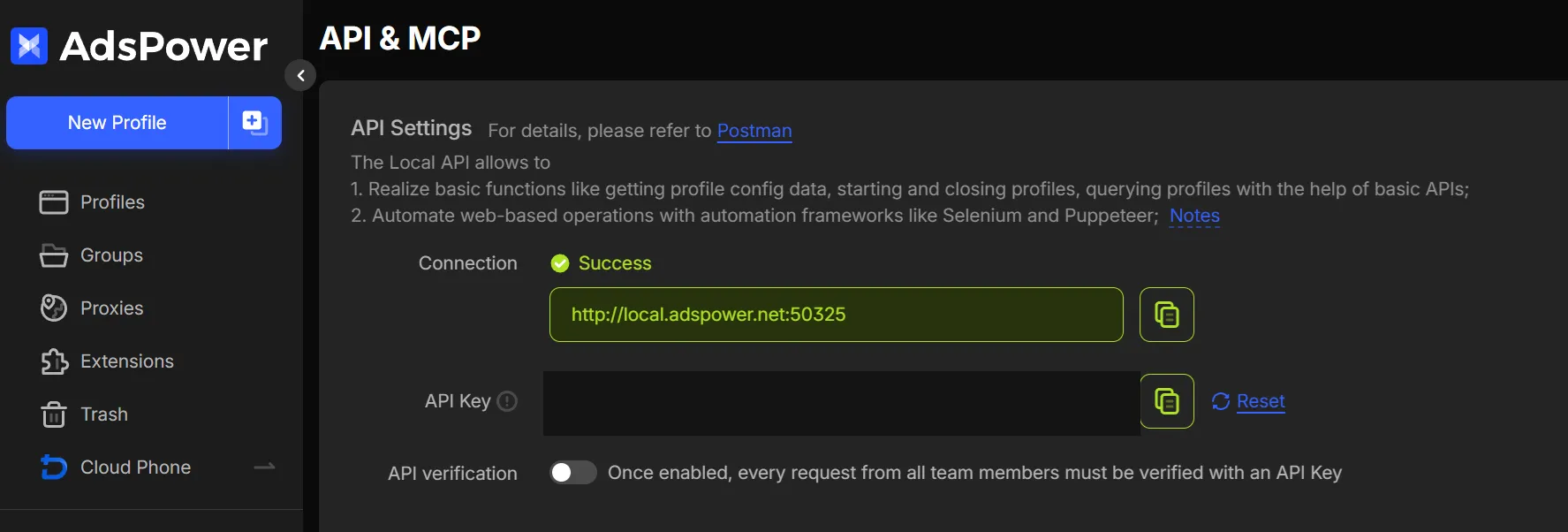
50325(configurable in settingsadspower_port) - ⚠️ Be sure to disable “API verification” (API & MCP → API Settings). If the toggle is on, every request to the local API requires a key, and AutoPilot won’t be able to start and stop profiles. The toggle must be off:
Dolphin:
- Enable Profile ID: Gear icon → Customize columns → Profile ID
- ▶️ The Dolphin Anty app must be running and you must be logged in — AutoPilot manages profiles via the local API (port
3001). Automation requires an active paid subscription (starting profiles via API is not available on the free plan). - 🔑 You must set your own token in the config:
dolphin_key=YOUR_API_TOKEN. Without it AutoPilot cannot fetch the profile’s proxy from Dolphin — the captcha will be solved from the wrong IP and registration/login will fail.- Where to get it: Dolphin Anty → Settings → API (or on dolphin-anty.com → API section) → create a token → copy the long string like
eyJ0eXAi.... - ⚠️ The token in the config template is a placeholder and already expired. Replace it with your own fresh one, otherwise you’ll get Dolphin errors.
- Where to get it: Dolphin Anty → Settings → API (or on dolphin-anty.com → API section) → create a token → copy the long string like
Vision:
- In config:
vision_config=folder_name,API_key - Local API port:
vision_port=53633(default 3030 — set your VisionM port)
Afina:
- In config:
afina_api_key=your_API_keyandafina_port=50778(default port) - The API key is found in Afina settings (Settings → API)
- 🆔
[PROFILE] profile_id= Account ID (a UUID like8e308a06-f9fd-4927-...) — the “Account ID” column in Afina (copy icon next to it). NOT the profile name and NOT the “ID” column (that’s an internal number the API does not accept). No such column? Top-right → Columns → enable Account ID. - ♻️ The profile is reused between actions automatically (not relaunched each time). Set
close_after=NOto keep it open. Login/register always start with a clean session.
🚨 Common errors:
| Error | Solution |
|---|---|
Dolphin local server offline but Dolphin isn’t installed | The AdsPower “Number” ended up in profile_id instead of the ID — see the top of this section |
| AdsPower connection error | Restart AdsPower, check port |
| Proxy is bad | Replace proxy in profile |
| Cache problems | Clear profile cache in AdsPower |
| Browser not opening | Check paid AdsPower subscription |
| Timeout loading page | Check proxy, change fingerprint |
🚀 Optimization: install Ublock/AdBlock in profiles to block ads — pages will load faster.
9. 🖥️ Screen Size
Section titled “9. 🖥️ Screen Size”The software automatically sets the resolution to 1920x1080 on the page, even if the browser window is smaller (window_size setting in config).
This ensures all UI elements display correctly and the software doesn’t miss buttons.
📐 The
window_size=1200,1000parameter in config sets the browser window size, but the internal page resolution is always 1920x1080.
10. ⚙️ Configuration: Key Parameters
Section titled “10. ⚙️ Configuration: Key Parameters”| Parameter | Description | Default |
|---|---|---|
activation_key | 🔑 Activation key | — |
captcha_key | 🧩 Captcha provider key (see section 4) | — |
speed_mode | 🏎️ Operation speed | FAST |
parallel_limit | 🔢 Parallel accounts limit | NO |
sleep_between_accounts | 💤 Pause between accounts | NO |
delay_between_accounts | ⏱️ Delay in seconds (min,max) | 60,120 |
shuffle_order | 🔀 Random order | YES |
close_after | 🚪 Close browser after | NO |
close_tabs | 🗂️ Close all tabs | YES |
check_mail | 📧 Check emails before start | YES |
full_withdraw | 💸 Full withdrawal of all assets | YES |
email_delay_check | ⏳ Email check interval | 30,300 |
market_trading_delay | 📈 Delay between trading cycles | 5,15 |
disable_kyc_protection | 🛡️ Allow 2FA without KYC | NO |
color_logs | 🎨 Colored logs in console | YES |
🕵️ Anti-detect: enable
shuffle_order=YESandsleep_between_accounts=YESwithparallel_limit=3-5for natural behavior.
11. 🔒 Security and Privacy
Section titled “11. 🔒 Security and Privacy”What the software sends:
- 📝 Error logs (only error descriptions, no personal data) — when error threshold is exceeded, for debugging
- 🔗 System hash during key verification — to track abusers
What the software does NOT send:
- 🚫 Passwords, email addresses, 2FA secret keys
- 🚫 Data from AutoPilot_table.xlsx
- 🚫 Email content and verification codes
- 🚫 Proxy data and cookies
🤝 Guarantees: 2+ years market reputation, deposits at Taverna OTC and Crypton OTC, 120+ partners.
12. 🔄 Updates
Section titled “12. 🔄 Updates”📥 Where to download AutoPilot:
Current builds are published in AutoPilot Chat (Telegram) in separate topics per exchange:
| Chat topic | Exchange | Platforms |
|---|---|---|
| Updates Bybit | Bybit AutoPilot | Windows / macOS / Linux |
| Updates MEXC | MEXC AutoPilot | Windows / macOS / Linux |
| Updates Bitget | Bitget AutoPilot | Windows / macOS / Linux |
Open the relevant topic → download the latest build for your OS → extract the archive. For macOS, see section 16: Launching on macOS — it describes the Gatekeeper quarantine removal process.
🔄 In-app auto-update:
AutoPilot checks for updates on every launch. If a new version is available:
- Wait for the message:
"AutoPilot new version downloaded successfully!" - Close the software
- Extract the
AutoPilot.ziparchive to the current folder with replacement - Launch the updated version
♾️ Lifetime: all updates are free forever.
⛔ Don’t interrupt the download: if you close the software during download — the archive may be corrupted. Wait for completion.
13. ⏰ License Duration
Section titled “13. ⏰ License Duration”The countdown starts from the first launch of AutoPilot with that key. The expiration date is displayed in the console on every launch.
14. 🚨 Common Errors and Solutions
Section titled “14. 🚨 Common Errors and Solutions”| Problem | Cause | Solution |
|---|---|---|
| 📧 Code not arriving by email | IMAP blocked / app password | Check mail_password, set up forwarding |
| 🧩 Captcha not solving | Datacenter proxy / rare captcha type | Switch to a residential proxy. If you hit a rare type — add a token provider captcha_key. Topping up the balance does not always help (see section 4) |
| 🌐 Profile not opening | AdsPower not running / free plan | Launch AdsPower, check subscription |
| 📊 Table not readable | Excel is open | Close Excel before launching |
| 🔐 2FA code not working | Time desync | Sync your computer time (Settings → Time) |
| ⏱️ Timeout on page | Slow proxy | Replace proxy or increase timeout |
| ⏳ Startup hangs on the captcha balance line | Old AutoPilot build | Update the software — older builds stopped dead when the provider balance fell below $0.05; now it’s just a warning |
| 🌐 Bybit: 2FA / email / captcha unstable | Regional domain version | Set bybitglobal in [BYBIT] domain column (see Bybit → Global Domains) |
🍎 Mac: file shown as “document” / killed: 9 | Gatekeeper quarantine | See section 16: Launching on macOS |
| 🛡️ VPN on — antidetect browser proxies stop working | Full-tunnel (TUN) mode | Switch the VPN to “System proxy” mode — see section 18 |
15. 💬 Contact Developer
Section titled “15. 💬 Contact Developer”Before contacting:
- ✅ Make sure all table fields are filled correctly
- 🔍 Check the chat — someone may have already solved this problem
- 📖 Read the logs carefully — they contain the main error information
When contacting, attach:
- 📄 Profile log file from the
/logsfolder - 📸 Screenshot or video of the issue (if possible)
16. 🍎 Launching on macOS
Section titled “16. 🍎 Launching on macOS”📥 First, download the macOS build from AutoPilot Chat (Telegram) — topic Updates Bybit / MEXC / Bitget depending on your exchange. See section 12: Updates for details.
On macOS, AutoPilot won’t launch with a double-click from Finder — the system blocks unsigned binary files. Launch is only via the terminal, and only after removing the Gatekeeper quarantine.
What you’ll see:
- The
AutoPilotfile appears as a “document” in Finder, not as a program - Errors:
cannot be opened because the developer cannot be verified,killed: 9,Operation not permitted
Quick cheat sheet (run in order in the terminal — we recommend warp.dev):
cd ~/Downloads/AutoPilot # your folder pathsudo xattr -r -c ./AutoPilot # remove macOS quarantinechmod +x ./AutoPilot # make executable./AutoPilot # launch🍎 Full guide (troubleshooting for
killed: 9/ Gatekeeper errors, Apple Silicon vs Intel, what to do after updates, FAQ): Launching AutoPilot on macOS →
💡 After the first launch, the
xattrandchmodsteps are no longer needed — subsequent launches only requirecdinto the folder and./AutoPilot. Repeat these steps after each update (the new binary comes with quarantine again).
17. 📧 Outlook: the “Unexpected close” error
Section titled “17. 📧 Outlook: the “Unexpected close” error”🩺 Symptom: under heavy use Outlook mail occasionally stops connecting — the log shows
Email connection error: Unexpected close. Your mailboxes are fine.
This is a temporary limit on the mail provider’s side — not a problem with your accounts, passwords, or antivirus. AutoPilot knows how to deal with it.
What to do:
- Just run it again — mail usually connects on the second or third try; AutoPilot retries the connection on its own.
- Working at large volumes and it keeps happening? AutoPilot has a stable-mail-under-load mode. Setup is individual — message support (section 15) and we’ll help enable it for your case.
18. 🛡️ VPN for pilots: system proxy mode
Section titled “18. 🛡️ VPN for pilots: system proxy mode”🩺 The pilot’s pain: you turn the VPN on — and proxies in your antidetect browser stop working: profiles don’t open, endless loading, wrong IP. In full-tunnel (TUN) mode every bit of system traffic goes through the VPN, including the antidetect browser’s connections to its own proxies — and the chain breaks.
The fix — “System proxy” mode. The VPN covers regular apps (Chrome, Telegram, the terminal, AutoPilot.exe), while antidetect browsers keep using their profile proxies: the system proxy does not apply to them unless you explicitly enable “use system proxy” inside the antidetect browser.
Step 1. Install the INCY client — Windows / macOS / Linux (Android too): GitHub → Releases
| OS | File |
|---|---|
| 🪟 Windows | incy-windows-setup.exe (or incy-windows-portable.zip) |
| 🍎 macOS | incy-macos-arm64.dmg (Apple Silicon) / incy-macos-intel.dmg (Intel) |
| 🐧 Linux | incy-linux-x64.deb / incy-linux-x64.rpm / incy-linux-x64-portable.zip |
Step 2. Add your VLESS subscription. You need a subscription link from a VPN provider — we recommend BlancVPN (VLESS + Reality, ~50 servers, 45 countries): get a subscription → — this link gets you 1 free month plus a discount. Copy the subscription link, open INCY and hit “Paste” (or ”+ Add”) — the server list loads by itself.
Step 3. Settings → Connection → enable “LAN through proxy”.
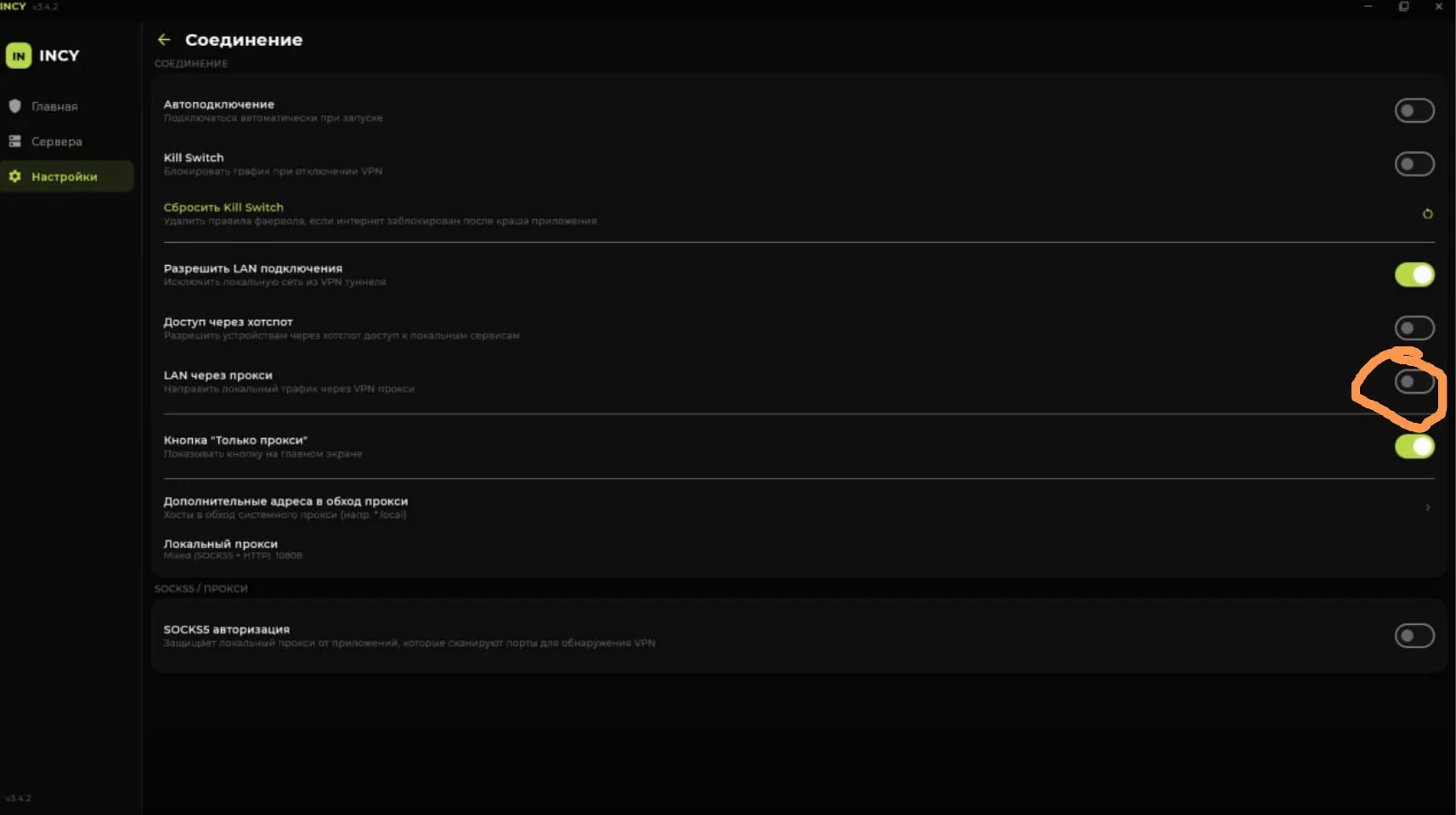
This toggle extends the VLESS proxy to local applications — to the terminal, and therefore to AutoPilot.exe itself.
Step 4. Home → pick the “System proxy” mode and press the power button.
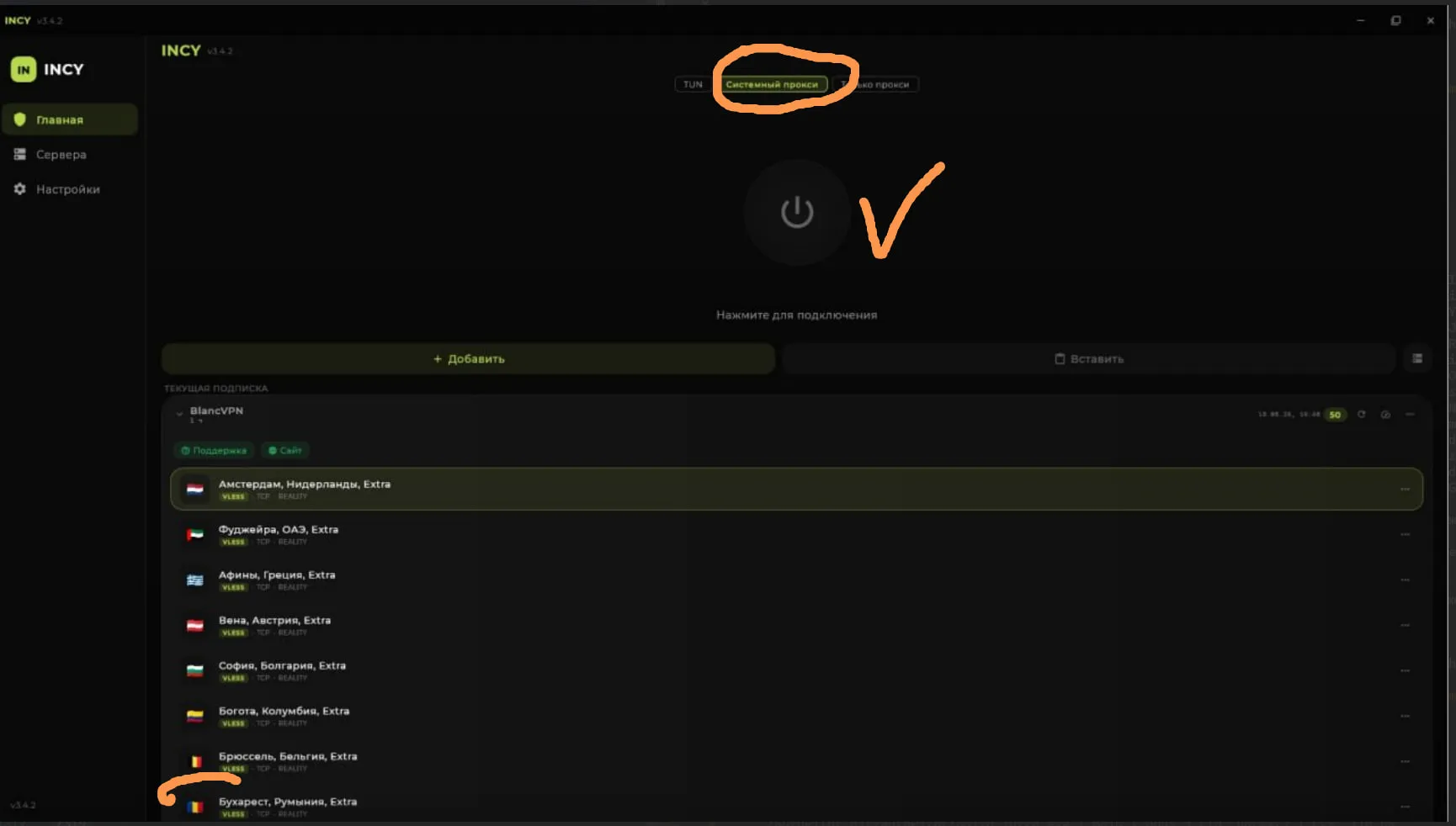
What you end up with:
| Traffic | Goes through |
|---|---|
Chrome, Telegram, terminal, AutoPilot.exe | VPN (your VLESS subscription) |
| AdsPower / Dolphin / Vision / Afina | the profile’s proxy — same as before |
🔌 If the antidetect app itself won’t load (panel doesn’t open, license/API unreachable on your network) — route the app’s own service traffic through the system proxy. In Afina: Network Detection → “Use system proxy for connection”, with the Detect system proxy and Test via system proxy buttons right there. Only the app’s traffic (API, fingerprints, license) goes through the proxy — profile proxies stay untouched.
⚠️ Do not enable TUN while working with antidetect browsers — full tunnel is exactly what breaks profile proxies. AutoPilot needs the “System proxy” mode.
💡 Screenshots are INCY v3.4.2 with the Russian interface — the menu items are the same in other languages.